Dell Pro Thunderbolt 4 Dock – WD25TB4


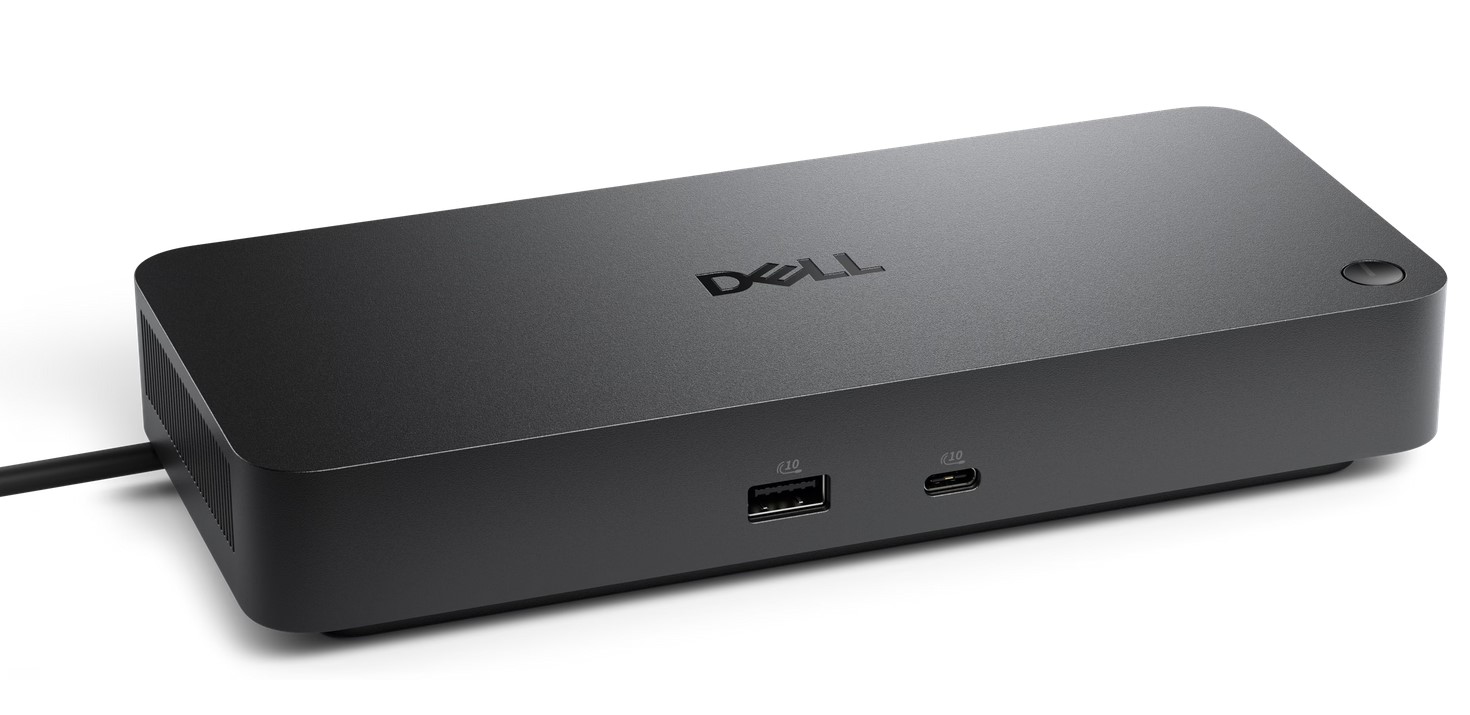
Dell Pro Thunderbolt 4 Dock – WD25TB4
Dell Pro Thunderbolt 4 Dock WD25TB4 არის დოკ-სადგური ლეპტოპისთვის Thunderbolt 4 შეერთებით. ერთი კაბელი მონიტორებისთვის, პერიფერიისა და ქსელისთვის. შეუკვეთეთ ELIS-ზე.
აღწერა
Main Technical Specifications
Computer Connection
Connection interface — Thunderbolt 4 (USB Type-C)
Connection type — Wired
Cable length — 0.83 m (2.72 ft)
Power
External power adapter — 180 W
Power delivery to laptop:
Up to 130 W for compatible Dell laptops
Up to 96 W for laptops from other manufacturers (USB Power Delivery)
Power for peripherals:
4 × USB-A — up to 4.5 W each
1 × USB-C — up to 15 W
1 × USB-C with DisplayPort Alt Mode — up to 7.5 W
2 × Thunderbolt 4 — up to 15 W each
Display Support
The docking station supports connection of up to 4 external displays.
Maximum supported resolutions, depending on the capabilities of the connected computer and Display Stream Compression (DSC) technology:
4 × QHD (2560 × 1440) @ 60 Hz
3 × WQHD (3440 × 1440) @ 60 Hz
4 × 4K UHD (3840 × 2160) @ 60 Hz
2 × 6K (6144 × 3456) @ 60 Hz
1 × 8K UHD (7680 × 4320) @ 60 Hz
1 × 5K WUHD (5120 × 2160) @ 60 Hz
Interfaces and Connectors
Video Connectors
2 × DisplayPort 1.4
1 × HDMI 2.1
1 × USB Type-C with DisplayPort 1.4 Alt Mode
2 × Thunderbolt 4 (downstream)
USB Ports
4 × USB 3.2 Gen 2 Type-A (10 Gbps)
1 × USB 3.2 Gen 2 Type-C (10 Gbps)
1 × USB Type-C with DisplayPort 1.4 Alt Mode
2 × Thunderbolt 4
Network Interface
1 × RJ-45 2.5 Gigabit Ethernet (10/100/1000/2500 Mbps)
Performance
Maximum USB data transfer rate — up to 10 Gbps
Thunderbolt 4 bandwidth — up to 40 Gbps
Maximum data transfer rate through the docking station — up to 1.25 GB/s
Supported Operating Systems
Windows 10
Windows 11
Ubuntu 24.04
Red Hat Enterprise Linux 9.6
macOS
ChromeOS
Management Features
Supported features include:
Intel AMT over Thunderbolt (for compatible Intel vPro PCs)
Wake-on-LAN
PXE Boot
MAC Address Pass-Through
WLAN to LAN Switch
Kernel DMA Protection
Dell Command Update
Dell Display and Peripheral Manager
Dock Power Button Sync
Firmware updates through the host computer
Firmware updates after device disconnection
Ability to disable ports through administrative tools
Security
Kensington Security Slot
Noble Wedge Lock slot
Dimensions
Width — 205 mm
Depth — 90 mm
Height — 35.3 mm
Weight
0.57 kg (1.25 lb)
Package Contents
Dell Pro Thunderbolt 4 Dock WD25TB4
180 W power adapter
Power cable
Quick Start Guide
Safety and Regulatory documentation
უპირატესობები
- Dell Pro Thunderbolt 4 დოკ-სადგური WD25TB4
- ერთი Thunderbolt 4 კაბელით ლეპტოპს უერთებთ მონიტორებს და პერიფერიას
- აფართოებს ლეპტოპის პორტებს სამუშაო მაგიდაზე
- შესაფერისია ოფისისა და დისტანციური მუშაობისთვის

მიწოდება
მიწოდების მეთოდები
- თბილისი, ბათუმი - 3 დღემდე
- რეგიონები - 5 დღემდე
- ექსპორტი შეთანხმების მიხედვით მენეჯერთან.
წვენების მიწოდების სერვისები
- DHL
- DPD

გადახდა
გადახდის მეთოდები
- ფიზიკური პირები - TBC ონლაინ, ApplePay, TBC განვადება
- იურიდიული პირები - გადახდა ანგარიშით უნაღდო ანგარიშსწორება.

ნაყარის მიწოდების წესები
ტექნიკური მახასიათებლები
- ბრენდი: Dell
მიწოდება
მიწოდების მეთოდები
- თბილისი, ბათუმი - 3 დღემდე
- რეგიონები - 5 დღემდე
- ექსპორტი შეთანხმების მიხედვით მენეჯერთან.
წვენების მიწოდების სერვისები
- DHL
- DPD
გადახდა
გადახდის მეთოდები
- ფიზიკური პირები - TBC ონლაინ, ApplePay, TBC განვადება
- იურიდიული პირები - გადახდა ანგარიშით უნაღდო ანგარიშსწორება.